<?xml version="1.0" encoding="UTF-8" ?>
<feed xml:lang="ja" xmlns="http://www.w3.org/2005/Atom" xmlns:dc="http://purl.org/dc/elements/1.1/" xmlns:thr="http://purl.org/syndication/thread/1.0">
  <title type="text">趣味でゲーム製作日記</title>
  <subtitle type="html">趣味でゲーム製作しています。おもにunityを使っています。ゲーム製作ブログです。</subtitle>
  <link rel="self" type="application/atom+xml" href="http://testaa.ryorika.com/atom"/>
  <link rel="alternate" type="text/html" href="http://testaa.ryorika.com/"/>
  <updated>2014-04-02T23:47:41+09:00</updated>
  <author><name>aaaaa</name></author>
  <generator uri="//www.ninja.co.jp/blog/" version="0.9">忍者ブログ</generator>
  <atom10:link xmlns:atom10="http://www.w3.org/2005/Atom" rel="hub" href="http://pubsubhubbub.appspot.com/" />
  <entry>
    <id>testaa.ryorika.com://entry/95</id>
    <link rel="alternate" type="text/html" href="http://testaa.ryorika.com/%E3%81%9D%E3%81%AE%E4%BB%96/%E3%83%8B%E3%82%B3%E3%83%8B%E3%82%B3%E7%94%9F%E6%94%BE%E9%80%81%E7%95%AA%E7%B5%84%E7%B4%B9%E4%BB%8B" />
    <published>2018-07-21T17:32:52+09:00</published> 
    <updated>2018-07-21T17:32:52+09:00</updated> 
    <category term="その他" label="その他" />
    <title>ニコニコ生放送番組紹介</title>
    <content mode="escaped" type="text/html" xml:lang="utf-8"> 
      <![CDATA[ニコニコ生放送番組一覧。結構便利　trend3d :&nbsp;<a href="http://www.trend3d.net/" title="">http://www.trend3d.net/</a>]]> 
    </content>
    <author>
            <name>aaaaa</name>
        </author>
  </entry>
  <entry>
    <id>testaa.ryorika.com://entry/94</id>
    <link rel="alternate" type="text/html" href="http://testaa.ryorika.com/zbrush/zbrush%E3%81%A7alpha%E3%82%92%E4%BD%9C%E3%82%8B" />
    <published>2017-02-25T04:59:14+09:00</published> 
    <updated>2017-02-25T04:59:14+09:00</updated> 
    <category term="zbrush" label="zbrush" />
    <title>zbrushでalphaを作る</title>
    <content mode="escaped" type="text/html" xml:lang="utf-8"> 
      <![CDATA[<br />
1.zbrushでモデリング<br />
2.blenderに持って行ってarray。<br />
3.zbrushで適度の大きさにしてライトを真ん中にする。<br />
　モデルが大きすぎるとライトの当たり方が変になるみたい。<br />
４．モデルのpositionを0にしてwitdとhightを512する。<br />
５．alphaのgrabdoc。<br />
6.photoshoで左右上下が合うように削って引き延ばす。]]> 
    </content>
    <author>
            <name>aaaaa</name>
        </author>
  </entry>
  <entry>
    <id>testaa.ryorika.com://entry/93</id>
    <link rel="alternate" type="text/html" href="http://testaa.ryorika.com/unity/animator%E3%81%A7%E3%82%A2%E3%83%8B%E3%83%A1%E3%83%BC%E3%82%B7%E3%83%A7%E3%83%B3%E9%80%94%E4%B8%AD%E3%81%A7%E7%A7%BB%E8%A1%8C%E3%81%99%E3%82%8B" />
    <published>2017-01-02T17:28:46+09:00</published> 
    <updated>2017-01-02T17:28:46+09:00</updated> 
    <category term="unity" label="unity" />
    <title>animatorでアニメーション途中で移行する</title>
    <content mode="escaped" type="text/html" xml:lang="utf-8"> 
      <![CDATA[animatorのtransitionのinspectorで Has Exit Timeがチェックされているとアニメーション途中で移行できないのでチェックを外す]]> 
    </content>
    <author>
            <name>aaaaa</name>
        </author>
  </entry>
  <entry>
    <id>testaa.ryorika.com://entry/92</id>
    <link rel="alternate" type="text/html" href="http://testaa.ryorika.com/android%20studio/android%20studio%20%E3%81%AEcomponet%20t" />
    <published>2016-12-31T05:05:21+09:00</published> 
    <updated>2016-12-31T05:05:21+09:00</updated> 
    <category term="android studio" label="android studio" />
    <title>android studio のcomponet treeのコピー　ペースト</title>
    <content mode="escaped" type="text/html" xml:lang="utf-8"> 
      <![CDATA[コピーしたいやつをctrl+クリックを押しながらずらす]]> 
    </content>
    <author>
            <name>aaaaa</name>
        </author>
  </entry>
  <entry>
    <id>testaa.ryorika.com://entry/91</id>
    <link rel="alternate" type="text/html" href="http://testaa.ryorika.com/unity/animator%E3%81%A7%E8%B5%B0%E3%82%8B%E3%83%A2%E3%83%BC%E3%82%B7%E3%83%A7%E3%83%B3%E3%81%A7%E3%83%AB%E3%83%BC%E3%83%97%E3%81%95%E3%81%9B%E3%82%8B" />
    <published>2016-12-28T15:28:19+09:00</published> 
    <updated>2016-12-28T15:28:19+09:00</updated> 
    <category term="unity" label="unity" />
    <title>animatorで走るモーションでループさせる</title>
    <content mode="escaped" type="text/html" xml:lang="utf-8"> 
      <![CDATA[走るモーションのinspectorでloopTime&gt;loopPoseをオンにすればanimatorでループされる]]> 
    </content>
    <author>
            <name>aaaaa</name>
        </author>
  </entry>
  <entry>
    <id>testaa.ryorika.com://entry/90</id>
    <link rel="alternate" type="text/html" href="http://testaa.ryorika.com/aftereffects/after%20effects%E3%81%A7%E3%81%AE%E6%9B%B8%E3%81%8D%E5%87%BA%E3%81%97%E6%B3%A8%E6%84%8F" />
    <published>2016-12-10T03:52:19+09:00</published> 
    <updated>2016-12-10T03:52:19+09:00</updated> 
    <category term="aftereffects" label="aftereffects" />
    <title>after effectsでの書き出し注意</title>
    <content mode="escaped" type="text/html" xml:lang="utf-8"> 
      <![CDATA[１：書き出す前に編集用にオーディオレベルを下げている場合は戻す。<br />
２：画質をフル画質にする<br />
３：プリセットはyoutube1080pで書き出し<br />
サイズは100ｍを超えるがニコニコで勝手に再エンコードされるので気にしない。<br />
<br />
]]> 
    </content>
    <author>
            <name>aaaaa</name>
        </author>
  </entry>
  <entry>
    <id>testaa.ryorika.com://entry/89</id>
    <link rel="alternate" type="text/html" href="http://testaa.ryorika.com/unity/webgl%E3%81%AE%E3%83%87%E3%83%90%E3%83%83%E3%82%B0%E3%82%92%E3%81%99%E3%82%8B" />
    <published>2016-12-08T19:10:37+09:00</published> 
    <updated>2016-12-08T19:10:37+09:00</updated> 
    <category term="unity" label="unity" />
    <title>webglのデバッグをする</title>
    <content mode="escaped" type="text/html" xml:lang="utf-8"> 
      <![CDATA[webglを置いたホームページに行って<br />
chormeでshift+Ctrl+jで<span style="color: #455463; font-family: 'Open Sans', sans-serif;">JavaScript コンソールが開く<br />
webglを動かすとDebug.Logがあるところがログに流れるのでそこで確認する。</span>]]> 
    </content>
    <author>
            <name>aaaaa</name>
        </author>
  </entry>
  <entry>
    <id>testaa.ryorika.com://entry/88</id>
    <link rel="alternate" type="text/html" href="http://testaa.ryorika.com/blender/blender%20%E3%81%A7array%E3%82%92%E4%BD%BF%E3%81%A3%E3%81%A6%E5%86%86%E4%B8%8A%E3%81%AB%E3%82%AA%E3%83%96%E3%82%B8%E3%82%A7%E3%82%AF%E3%83%88%E3%82%92%E9%85%8D%E7%BD%AE%E3%81%99%E3%82%8B" />
    <published>2016-12-06T21:09:10+09:00</published> 
    <updated>2016-12-06T21:09:10+09:00</updated> 
    <category term="blender" label="blender" />
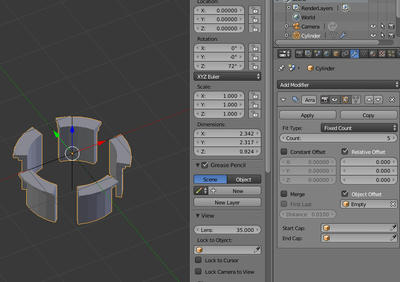
    <title>blender でarrayを使って円上にオブジェクトを配置する</title>
    <content mode="escaped" type="text/html" xml:lang="utf-8"> 
      <![CDATA[<a target="_blank" href="//testaa.ryorika.com/File/7a99564a.jpeg" title=""><img src="//testaa.ryorika.com/Img/1481025975/" alt="" /></a><a target="_blank" href="//testaa.ryorika.com/File/08fb8bce.jpeg" title=""> <br />
</a>1.add modifire でarrayを選択<br />
2.&nbsp;relative Offsetを全部0<br />
3.emptyを作って object Offsetにセット<br />
4.emptyとオブジェクトのlocationはゼロ<br />
5.emptyとオブジェクトのscaleは１<br />
5.emptyのrotationのzを回転させる<br />
<br />
]]> 
    </content>
    <author>
            <name>aaaaa</name>
        </author>
  </entry>
  <entry>
    <id>testaa.ryorika.com://entry/87</id>
    <link rel="alternate" type="text/html" href="http://testaa.ryorika.com/aftereffects/after%20effects%E3%81%A7%E6%96%87%E5%AD%97%E3%83%AC%E3%82%A4%E3%83%A4%E3%83%BC%20%E3%81%AE%E6%96%87%E5%AD%97%E6%83%85%E5%A0%B1" />
    <published>2016-12-05T02:05:20+09:00</published> 
    <updated>2016-12-05T02:05:20+09:00</updated> 
    <category term="aftereffects" label="aftereffects" />
    <title>after effectsで文字レイヤー の文字情報をコピーペーストはできないみたい</title>
    <content mode="escaped" type="text/html" xml:lang="utf-8"> 
      <![CDATA[ある文字レイヤーの文字属性をコピーペーストができないみたいなので<br />
一から設定する。<br />
複数の文字レイヤーを設定したいときは複数選択して一回だけ設定すればできる。]]> 
    </content>
    <author>
            <name>aaaaa</name>
        </author>
  </entry>
  <entry>
    <id>testaa.ryorika.com://entry/86</id>
    <link rel="alternate" type="text/html" href="http://testaa.ryorika.com/unity/blender%E3%81%AE%E3%83%A2%E3%83%87%E3%83%AB%E3%81%8B%E3%82%89%E3%82%A2%E3%82%A4%E3%82%B3%E3%83%B3%E3%82%92%E4%BD%9C%E3%82%8B%E3%81%9F%E3%82%81%E3%81%AE%E6%BA%96%E5%82%99" />
    <published>2016-12-04T14:54:09+09:00</published> 
    <updated>2016-12-04T14:54:09+09:00</updated> 
    <category term="unity" label="unity" />
    <title>blenderのモデルからアイコンを作るための準備</title>
    <content mode="escaped" type="text/html" xml:lang="utf-8"> 
      <![CDATA[1.3d viewで nキー<br />
2.display only Rnderオン<br />
3.ctrl space<br />
4.print screen<br />
5.photoshopに貼り付け<br />
6.背景を自動選択ツールで削除]]> 
    </content>
    <author>
            <name>aaaaa</name>
        </author>
  </entry>
</feed>